

Fast Charging vs Regular Charging: Key Differences
When it comes to charging your devices, the choice between fast charging and regular charging depends on your priorities - speed or battery health. Fast chargers deliver higher power (10W to 240W) and can charge your phone to 50% in 15–30 minutes. Regular chargers, typically at 5W, take 2.5–4 hours for a full charge but are gentler on your battery over time.
- Fast Charging: Ideal for quick top-ups. Uses higher wattage and advanced protocols like USB-PD or Quick Charge to speed up charging. Generates more heat, which can affect long-term battery health.
- Regular Charging: Slower but safer for overnight charging. Operates at lower wattage, producing less heat and stress on the battery.
Quick Comparison:
| Feature | Regular Charging | Fast Charging |
|---|---|---|
| Speed | 2.5–4 hours | 15–30 minutes (50%) |
| Power Output | 5W–15W | 18W–240W |
| Heat Generation | Minimal | Higher |
| Battery Impact | Gentler | May increase wear |
| Best Use | Overnight | Quick boosts |
Fast charging is perfect for busy schedules, while regular charging is better for preserving long-term battery life. Choose based on your needs.
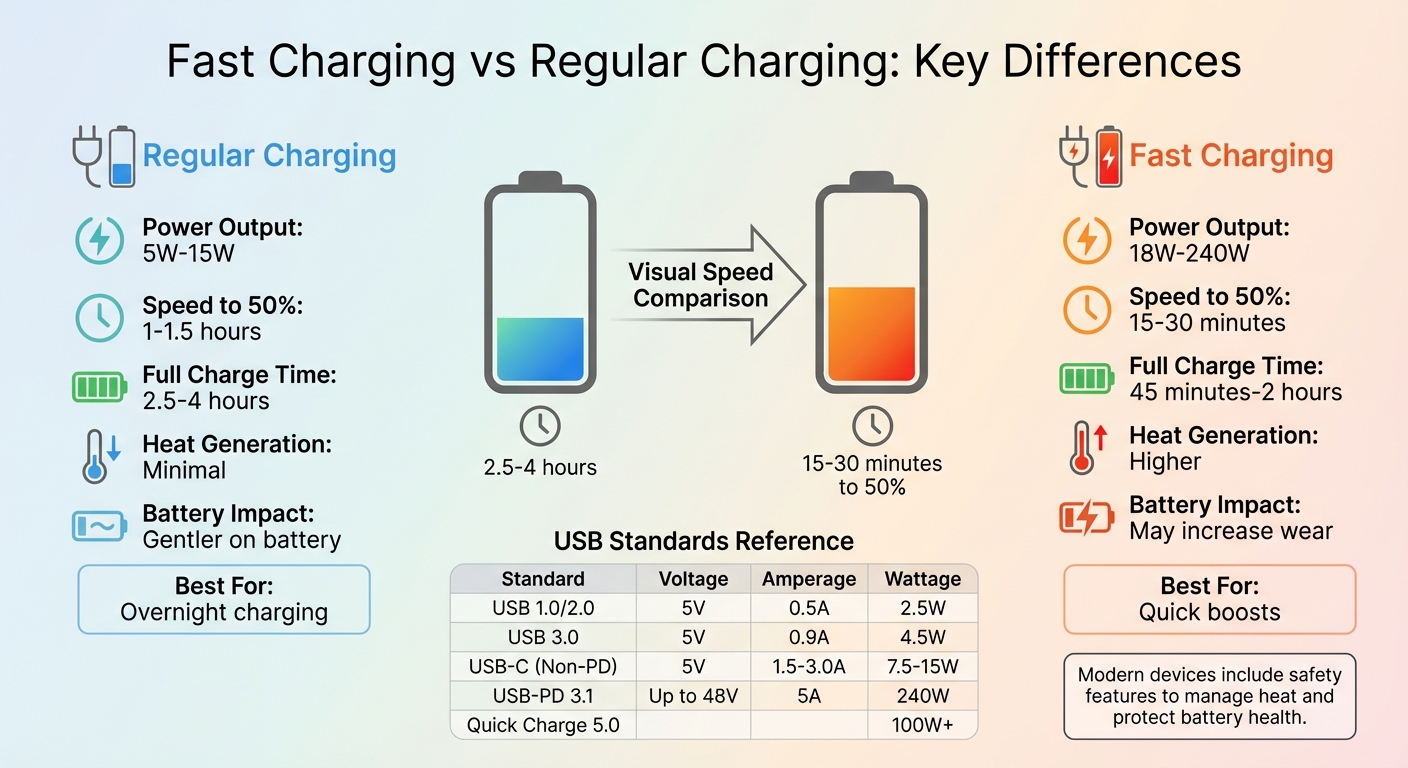
Fast Charging vs Regular Charging: Speed, Power Output, and Battery Impact Comparison
USB C Charging and Fast Charging Explained
sbb-itb-205d366
How Regular Charging Works
Regular charging is the baseline for understanding how fast charging differs in terms of speed and its effects on battery health. It operates with a fixed 5V output, which is the standard for USB interfaces, and delivers power at a steady, predictable rate. There’s no complex communication between your device and the charger - plug it in, and the power flows consistently until your battery is full. Importantly, devices only draw the current they need. For instance, if your phone requires 500mA, it won’t pull more than that, even if the charger is capable of delivering 1.5A. This simplicity ensures safe and reliable charging, offering a point of comparison with more advanced charging methods.
The current (amperage) varies depending on the USB version in use. USB 1.0 and 2.0 provide 500mA (2.5W), while USB 3.0 increases that to 900mA (4.5W). Wall chargers typically deliver between 1A and 1.5A (5–7.5W). While these numbers might seem modest compared to today’s fast chargers, they’re enough to power most devices, albeit at a slower pace.
"A good charger provides the base for well-performing and durable batteries." – Battery University
The charging process itself is straightforward. A constant current flows into the battery until it reaches its peak voltage - usually 4.20V per cell for lithium-ion batteries. At this point, the current gradually tapers off to safely top up the battery. This method generates minimal heat, which is a big plus for battery longevity. Batteries kept under 27°C (80°F) degrade much slower compared to those exposed to the higher temperatures often associated with fast charging.
Standard Charging Protocols
Most regular charging protocols are based on older USB standards, which were originally designed for data transfer rather than power delivery. USB 1.0 and 2.0 prioritized data transmission, with power delivery as a secondary feature. USB 3.0, however, raised the current limit to 900mA to support high-speed data transfer without interference from thin ground wires.
Wall chargers have also evolved. The USB Battery Charging Revision 1.2 (BC1.2) standard, introduced in 2011, allows charging currents up to 1.5A at 5V. These chargers use a simple mechanism: the D- and D+ data pins are connected internally by a resistor (200 ohms or less), signalling to the device that it can safely draw more current. Meanwhile, USB Type-C 1.2 (without Power Delivery) can handle up to 3A at 5V, delivering 15W of power. Despite this higher capacity, it’s still categorized as regular charging since it lacks the advanced communication protocols used by fast charging standards like USB-PD or Quick Charge.
| USB Specification | Voltage | Current | Max Power Output |
|---|---|---|---|
| USB 1.0 / 2.0 | 5V | 0.5A | 2.5W |
| USB 3.0 | 5V | 0.9A | 4.5W |
| USB BC 1.2 (DCP) | 5V | 1.5A | 7.5W |
| USB-C (Non-PD) | 5V | 1.5A / 3.0A | 7.5W / 15W |
Charging Speeds and Timeframes
Using a standard 5W charger, it typically takes 2.5 to 4 hours to fully charge a modern smartphone. Charging through an older USB 2.0 port on a laptop, which delivers only 2.5W, could take even longer - especially if the phone is in use while charging. In fact, a USB 2.0 port might not provide enough power to keep up with a phone running at full brightness, potentially leading to a net battery drain.
Regular charging focuses on steady, reliable power delivery, not speed. Basic overnight chargers often deliver a fixed charge rate of about 0.1C (one-tenth of the battery’s rated capacity), taking 14 to 16 hours for a full charge. Though slow, this method is gentle on the battery, producing far less heat than fast charging and minimizing stress on the battery cells over time.
"The main job of any modern charging system is to balance speed and heat." – Chargie.org
For everyday, non-urgent charging, regular charging is more than sufficient. It prioritizes a cooler, more stable charging environment, which is better for battery health in the long run. While it won’t win any speed contests, regular charging is a reliable and low-stress option for keeping your devices powered.
How Fast Charging Works
Fast charging works by dynamically adjusting power delivery, using higher voltage and/or amperage to speed up the process. Imagine it like a plumbing system: voltage is the water pressure, amperage is the hose's width, and wattage (V × A = W) is the total water flowing through. While regular chargers supply 5W to 10W, fast chargers can deliver between 18W and 240W, significantly cutting down charging time. This process relies on a digital "handshake" between the charger and the device to ensure safe and efficient energy transfer.
Unlike standard chargers, which push a fixed amount of power, fast chargers and devices negotiate a "power contract." They communicate to decide on the voltage and current levels the device can handle before charging begins. For example, USB Power Delivery (USB-PD) uses Configuration Channel (CC) pins in USB-C connectors, while Qualcomm Quick Charge relies on data lines (D+/D-) for this process. Once the handshake is complete, the device's charge controller manages the electricity flow, preventing spikes and adjusting current as needed.
Fast charging happens in stages: the initial "Fast Stage" (0–80%) delivers maximum power, while the later "Slowing" and "Trickle" stages (80–100%) reduce power to minimise heat and prolong battery life. This phased approach ensures rapid charging without compromising safety.
Fast Charging Standards
USB Power Delivery (USB-PD) is widely adopted by brands like Apple, Google, and Samsung, and is also used for laptops. The latest version, USB-PD 3.1, can deliver up to 240W (48V and 5A), making it suitable for everything from earbuds to gaming laptops. Chargers advertise their capabilities through Power Data Objects (PDOs) - specific voltage/current profiles like 9V/3A (27W) or 20V/5A (100W) - allowing devices to select the most suitable option.
A standout feature of USB-PD is Programmable Power Supply (PPS), which allows fine-tuned voltage adjustments in 20mV increments every 10 seconds. This reduces heat and energy loss, which is why Samsung's Super Fast Charging requires PPS-compatible chargers. For high-wattage charging (over 60W), cables with embedded E-marker chips are necessary. These chips communicate the cable’s capacity to ensure safe power delivery.
Qualcomm Quick Charge is another major standard, especially for Snapdragon-powered Android devices. Quick Charge 5.0 supports over 100W of power, capable of charging a smartphone to 50% in just five minutes. It uses Intelligent Negotiation for Optimum Voltage (INOV), allowing devices to request voltage in 200mV increments, reducing energy loss. Quick Charge 4.0 and newer versions are compatible with USB-PD, making them versatile.
Proprietary standards like OnePlus Warp Charge and Oppo's SuperVOOC push boundaries even further, offering 65W to 150W by focusing on high amperage. These systems use specialised cables and chargers with built-in microcontrollers to manage power in real time. However, they are brand-specific - connecting a OnePlus phone to a generic USB-PD charger often results in slower speeds, typically between 18W and 27W.
| Standard | Max Power | Key Mechanism | Compatibility |
|---|---|---|---|
| USB-PD 3.1 | 240W | High Voltage (up to 48V) | Universal (Apple, Google, laptops) |
| Qualcomm QC 5.0 | 100W+ | INOV (precise voltage tuning) | Snapdragon-based Androids |
| OnePlus Warp/VOOC | 65W–150W+ | High Amperage (real-time modulation) | Proprietary (OnePlus, Oppo) |
Power Output and Efficiency
Fast charging typically ranges from 18W to 100W for smartphones and tablets, while laptops can go up to 240W. For comparison, a standard USB 2.0 port delivers just 2.5W, whereas a modern 30W USB-PD charger offers about 12 times that power. This increased wattage translates to much faster charging times. For example, a 5W charger might take 2.5–4 hours to fully charge a device, but a 30W to 65W fast charger can achieve a similar result in 30 minutes to an hour.
Efficiency is highest during the 0–80% charging phase, where the battery can handle more current without overheating. A 30W charger, for instance, can take a smartphone from 0% to 50% in just 15–30 minutes, compared to over an hour with a 5W charger. After 80%, charging slows down to prevent overheating and extend battery life.
It's worth noting that higher wattage doesn’t harm devices. Modern devices only draw the power they need. For instance, a 140W charger can safely charge a device at its maximum supported rate, whether that’s 18W, 30W, or 65W. If a fast-charging protocol isn’t negotiated, the system defaults to a slower speed, typically 5W or 10W. This ensures compatibility and safety across devices and chargers.
Charging Speed Comparison
Fast charging offers a noticeable improvement over regular charging, especially when you're short on time. With a standard 5W charger, you can expect to wait around 1 to 1.5 hours to reach 50% battery capacity, and a full charge might take anywhere from 2.5 to 4 hours. In contrast, fast charging can hit 50% in as little as 20 to 30 minutes, making it a game-changer for busy schedules.
The greatest speed boost occurs during the early stages of charging. Fast chargers deliver maximum power when the battery is below 50%, making them perfect for quick top-ups - whether you're on a coffee break or commuting. After the battery reaches 80%, charging speeds naturally slow down to prevent wear and tear, a safeguard for long-term battery health. This difference in speed is backed by recent real-world tests.
In March 2026, testing revealed how charger wattage directly impacts performance. For example:
- The OnePlus 13, equipped with an 80W charger, charged its 6,000 mAh battery to 93% in just 30 minutes and hit 100% in 37 minutes.
- The iPhone 17 Pro Max, using a 40W charger, reached 64% in 30 minutes and took 1 hour 15 minutes for a full charge.
- The Galaxy S25 Ultra, with a 45W charger, achieved 71% in 30 minutes and fully charged in 1 hour.
Battery size also plays a key role in charging speed. Smaller batteries - like those around 3,000 mAh - will charge more quickly than larger ones when using the same charger. However, higher wattage can offset the challenges of larger battery capacities. For instance, the OnePlus 13's 80W charger charges its 6,000 mAh battery faster than the iPhone 17's 40W charger can handle its smaller 3,692 mAh battery.
Comparison Table: Regular Charging vs Fast Charging
| Charger Type | Power Output | 50% Charge Time | Full Charge Time | Typical Use Case |
|---|---|---|---|---|
| Standard Charger | 5W | 1–1.5 hours | 2.5–4 hours | Overnight charging, older devices |
| Basic Fast Charger | 18W–30W | 25–35 minutes | 1.5–2 hours | Standard modern smartphones |
| Advanced Fast Charger | 65W–120W+ | 15–25 minutes | 45–60 minutes | Flagship phones, quick top-ups |
| Wireless Pad (Qi) | 7.5W–15W | 85 minutes | 2.5–3 hours | Desk/nightstand convenience |
Impact on Battery Health and Longevity
Heat Generation and Battery Degradation
Fast charging has a downside: it generates heat, and heat is a major factor in battery wear. When a battery charges at high speeds, its internal resistance increases, producing thermal energy that accelerates chemical breakdown. As Florian Kastner from PCWorld puts it, "Heat is therefore the main reason why batteries degrade. Many users see this problem with the 'fast charging function,' because the more current flows into the battery, the more excess heat is generated."
Lab tests highlight this issue clearly. A battery charged at an ultra-fast 4C rate dropped to just 67.3% of its original capacity after only 10 cycles. In comparison, charging at a slower 2C rate resulted in a minimal 2.1% capacity loss after 20 cycles. The reason? High temperatures encourage lithium plating, which not only reduces capacity but also increases the chances of thermal runaway.
Real-world testing backs this up. In March 2025, Android Authority's Robert Triggs compared the thermal performance of two devices. The OnePlus 13, charging at 64.8W, kept its internal temperature at a maximum of 32.7°C and reached 96% charge in just 30 minutes. On the other hand, the Google Pixel 9 Pro, charging at a slower 25.5W, hit 42.2°C - exceeding the recommended 40°C safety limit. Triggs noted, "Higher temperatures suggest more power being wasted, which in turn heats the battery, contributing to a reduced lifespan." Despite its slower charging, the Pixel's higher temperatures posed a greater risk to its battery's health compared to the cooler, faster-charging OnePlus.
Regular charging avoids these extremes by operating at lower current densities, keeping temperatures within the optimal range of 25°C to 40°C. This gentler process allows lithium ions to integrate smoothly into the anode, reducing mechanical stress and limiting SEI layer growth. While slower, this method works well for scenarios like overnight charging, where speed isn't a priority.
To address these challenges, manufacturers have introduced advanced safety measures.
Safety Mechanisms in Modern Devices
Modern smartphones and tablets now include features designed to protect batteries from heat-induced damage. One key safeguard is the Battery Management System (BMS), which monitors temperature and charge levels in real time. As the battery nears 80–100% capacity, the system slows down the charging process - known as trickle charging - to prevent overcharging and voltage stress.
Some devices use dual-cell architecture, splitting the incoming current between two cells. This approach effectively doubles charging speeds without concentrating heat on a single cell. Xiaomi and Oppo have embraced this technology with impressive results: Xiaomi guarantees 80% capacity retention after 800 full cycles with its 120W charging, while Oppo's SuperVOOC achieves the same retention after 1,600 cycles.
Thermal management is also improving. Flagship devices now feature vapor chambers, heat shields, and liquid cooling to dissipate heat during high-wattage charging. For example, March 2025 tests showed the Samsung Galaxy S25 Ultra maintaining an average internal temperature of 32.4°C and peaking at 35.3°C while charging at 42.7W using USB Power Delivery with Programmable Power Supply (PPS).
Software solutions complement these hardware advancements. Adaptive charging in both iOS and Android learns your daily routine, delaying charging beyond 80% until just before you wake up, reducing the time the battery spends at high voltage. Another feature, bypass charging, powers the device directly during demanding tasks, helping to keep the battery cooler. Together, these hardware and software innovations mean that while fast charging still generates heat, modern devices are much better equipped to handle it than they used to be.
Choosing the Right Charging Method
Picking the best charging method depends on your lifestyle and how you use your devices. The choice between fast and regular charging comes down to balancing speed with long-term battery care. Fast charging is perfect for quick power-ups, while regular charging is better for preserving battery health over time.
When to Use Fast Charging
Fast charging is a lifesaver when time isn’t on your side. Imagine needing to leave the house in 20 minutes, and your phone is nearly out of power. A high-wattage charger can get your battery to 50% in that short window. For example, Apple tested preproduction iPhone 17 Pro Max units in July 2025 using a 40W Dynamic Power Adapter (Model A3351), and the device reached 50% in about 20 minutes. This makes fast charging ideal for emergencies, quick top-ups between meetings, or powering up while using energy-draining apps like GPS on a road trip.
Fast charging works most efficiently when your battery is between 0% and 80%. Beyond 80%, your phone slows down to a "trickle charge" to protect the battery. For an even quicker charge, turning on Airplane Mode can reduce background power usage.
When to Use Regular Charging
Regular charging is the way to go when speed isn’t a priority. For instance, if you’re plugging in your phone overnight, there’s no reason to push it with high wattage. A standard 5W charger generates less heat and is easier on your battery. This approach is especially helpful if you want to extend the lifespan of your device or if you’re charging an older model that doesn’t support fast charging.
Regular charging also helps maintain better long-term battery health. Keeping your battery level between 20% and 80% reduces stress on the battery, which can be especially useful if you’re not constantly monitoring charge levels. Plus, since standard charging doesn’t generate as much heat, there’s no need to worry about removing your phone case to keep the device cool.
Feature Comparison Table
| Factor | Regular Charging | Fast Charging |
|---|---|---|
| Speed | Slower, takes several hours to fully charge | Much faster; can reach 50% in about 20 minutes |
| Battery Health | Gentler, great for overnight charging | Better for quick boosts; may generate more heat |
| Heat Generation | Minimal, less stress on the battery | Higher; needs good thermal management |
| Cost | Less expensive chargers | Pricier due to advanced technology |
| Device Compatibility | Works with most devices | Requires support for fast-charging protocols like USB-PD or Qualcomm Quick Charge |
Conclusion
Choosing between fast and regular charging comes down to your specific needs and how you use your device. Regular charging provides a steady 5W of power, taking longer to charge your battery but generating less heat. On the other hand, fast charging delivers between 20W and 240W, allowing you to reach 50% in just 15 to 30 minutes, though it does produce more heat.
Modern devices are equipped with smart Battery Management Systems that adjust power levels if temperatures rise too high. Still, keeping heat in check is essential for preserving battery health. Fast charging is ideal for quick boosts when you're pressed for time, while regular charging is better suited for extended sessions, such as overnight, to help maintain lower temperatures.
To maximize battery lifespan, aim to keep your charge levels in the mid-range. Also, ensure your charger and cable are compatible with your device's charging protocol, such as USB Power Delivery for iPhones and Pixels or Qualcomm Quick Charge for many Android devices.
Both methods have their advantages. When used thoughtfully, fast charging won’t harm your battery, and regular charging remains a dependable choice for everyday use. Tailor your charging habits to your routine to maintain your device’s performance and extend its lifespan.
FAQs
Will fast charging shorten my battery life?
Fast charging won't damage your battery life if used responsibly. Today's smartphones are equipped with sophisticated systems to manage voltage and temperature, which helps prevent issues like overheating. While high power levels and excessive heat can wear down a battery faster, features like optimized charging are designed to protect its longevity. To keep fast charging safe and efficient, stick to certified chargers and follow the manufacturer's recommendations for best results.
How do I know if my phone supports USB-PD or Quick Charge?
To find out if your phone supports USB-PD or Quick Charge, check its specifications or user manual. This information is usually listed in the product details or on the manufacturer’s website. Not sure? Try using a compatible fast charger - if your phone charges faster, it likely supports one of these standards. USB-PD is commonly supported across devices, while Quick Charge is more specific to certain Android models.
Do I need a special cable for fast charging?
When it comes to charging cables, most will get the job done for basic charging. However, if you're aiming for top-notch performance and faster charging speeds, it's a good idea to use a cable that's rated for fast charging standards. These cables are built to handle higher power delivery, ensuring both compatibility and better efficiency.